Fire & EMS Time Clock Guide: How to Track Volunteer and Paid Hours
How fire and EMS departments should track volunteer and paid hours in 2026, from geofenced phone clock-in and station kiosks to Face ID, missed clock-outs, FLSA basics, and the records worth keeping.
Every fire department tracks time.
Most of them just can't find the records.
There's a sign-in sheet on the clipboard by the bay door. A drill roster in the training officer's truck. A duty log in a binder. A spreadsheet someone updates on Sunday nights, when they remember. And when the chief needs to know who was on duty last Tuesday at 2 a.m., the answer starts with "let me ask around."
That works until an audit, an injury claim, a points dispute, or a payroll question shows up. Then every missing clock-out becomes somebody's afternoon.
A time clock for a fire or EMS department isn't really about punching in. It's about having one record of who served, when, and doing what, that everyone trusts. This guide covers how to set that up for volunteer, paid-on-call, combination, and career departments, what federal labor rules mean for your records, and what to look for in clock in and out software.
Quick answer: Fire and EMS departments should track hours with a time clock members can use from a phone, the department portal, or a station kiosk, with geofencing so phone clock-ins only count at the station. Every entry should record the job or activity, keep an edit history, and flag missed clock-outs for an officer to fix. Volunteer hours are tracked for participation, retention points, and proof of duty, not as wages. Paid hours follow FLSA rules, including the 7(k) work period for fire protection employees.
This article explains general rules in plain English. It isn't legal advice. Check with your department's attorney or HR before changing how you pay or classify members.
Why Fire and EMS Hours Are Hard to Track
An office has one door and one schedule. A fire station has neither.
- Members come and go at odd hours. Calls, standby, station duty, and night drills don't fit a 9-to-5 timesheet.
- One person can wear three hats. The same member might pull station duty Saturday, teach a CPR class Sunday, and work a paid event detail Monday.
- Not all hours count the same. Duty hours, training hours, call responses, and details can count toward different requirements, points, or pay.
- The records outlive the people. When the officer who kept the binder steps down, the history leaves with them.
- Paper can't flag a problem. A sign-in sheet will never tell you someone forgot to sign out three days ago.
The fix isn't a better clipboard. It's a system that captures the hours once, when they happen, and sends them everywhere they need to go.
Volunteer, Paid-on-Call, and Career: Different Reasons to Clock In
Before you pick a tool, be clear about why your members are clocking in. The answer changes what you need.
Volunteer departments
Volunteers clock in so the department can see participation. That record feeds retention programs, points or credits, a Length of Service Award Program (LOSAP) if you have one, annual reports, and the simple question of who has been showing up. It also documents that a member was on duty if they get hurt.
Paid-on-call and stipend departments
Here the hours or calls drive a payment, so accuracy matters more, and the classification questions start. More on that in the FLSA section below.
Career and combination departments
Paid hours drive payroll and overtime. Combination departments carry both: paid staff whose hours drive pay, and volunteers whose hours drive participation. Keeping both groups in one system, with the right job attached to every entry, is what stops them from getting tangled.
What the FLSA Means for Fire and EMS Time Records
The Fair Labor Standards Act (FLSA) has specific rules for public-sector volunteers and for fire protection employees. These are the ones that touch your time clock.
Who counts as a volunteer
Under federal rules, a volunteer for a public agency serves for civic, charitable, or humanitarian reasons, without promise, expectation, or receipt of compensation (29 CFR 553.101). Volunteers can still receive expenses, reasonable benefits, or a nominal fee without losing that status (29 CFR 553.106).
Whether a fee is "nominal" depends on the facts. The Department of Labor has generally treated a fee of up to about 20 percent of what the department would otherwise pay someone for the same work as nominal, and the fee can't act as a substitute for wages or be tied to productivity. Per-call fees can be acceptable. A fee that rises with every hour worked starts to look like a wage, which is a good reason to record volunteer hours for participation instead of paying them by the hour.
Paid employees volunteering for their own department
A paid employee generally can't volunteer to do the same type of work for the same public agency that employs them (29 CFR 553.102). That's why combination departments need to know which hat a member was wearing for every entry. A time clock that records a job on each entry, and limits which jobs each role can pick, makes the line visible instead of assumed.
The 7(k) work period for fire protection employees
Section 7(k) lets public agencies pay fire protection employees overtime on a work period of 7 to 28 days instead of a standard 40-hour week. In a 28-day period, overtime starts after 212 hours, and the threshold scales down for shorter periods (106 hours in 14 days, for example). EMTs and paramedics count as fire protection employees only when they meet specific conditions, such as being trained in fire suppression and employed by a fire department. The Department of Labor's Fact Sheet #8 has the details.
A time clock doesn't calculate overtime on its own, but it has to hand clean, complete hours to whatever does.
How long to keep the records
Federal recordkeeping rules require employers to keep payroll records for at least three years and the time cards and schedules behind them for at least two years (29 CFR Part 516). Your state, your insurer, or your retention program may require longer. Paper sign-in sheets rarely survive that long in readable shape.
| Rule | What it means for your time clock |
|---|---|
| Volunteers serve without expectation of pay | Track volunteer hours for participation, points, and proof of duty, not as hourly wages. |
| Nominal fees can't be tied to productivity | Be careful paying volunteers by the hour. Per-call or flat stipends are more common. |
| Same-work rule for paid employees | Record which job a member worked, so paid and volunteer hours never blur. |
| 7(k) work periods | Hours have to land in the right work period, with clean start and end times. |
| Record retention | Keep time records at least two years and payroll records at least three. |
Clock-In Methods Compared
Members won't use a time clock that's slower than the clipboard. The method has to fit where they are when the shift starts.
| Method | Best for | Watch out for |
|---|---|---|
| Portal or dashboard | Officers and staff already signed in at a computer | Members in the bay won't walk to an office to clock in |
| Phone | Volunteers arriving from home, details, and off-site training | Without a location check, nothing stops a clock-in from the couch |
| Phone with geofencing | Phone clock-in that only counts at the station | Members have to allow location, and indoor GPS can be off by a couple hundred feet |
| Station kiosk with a PIN | A shared tablet or screen by the door, no personal phone needed | PINs get shared unless they're unique and private |
| Station kiosk with face recognition | Fast, hands-free clock-in at the station | Needs member consent and a clear biometric policy |
Most departments end up using two or three. A station kiosk covers members who don't want an app, and geofenced phone clock-in covers everyone else.
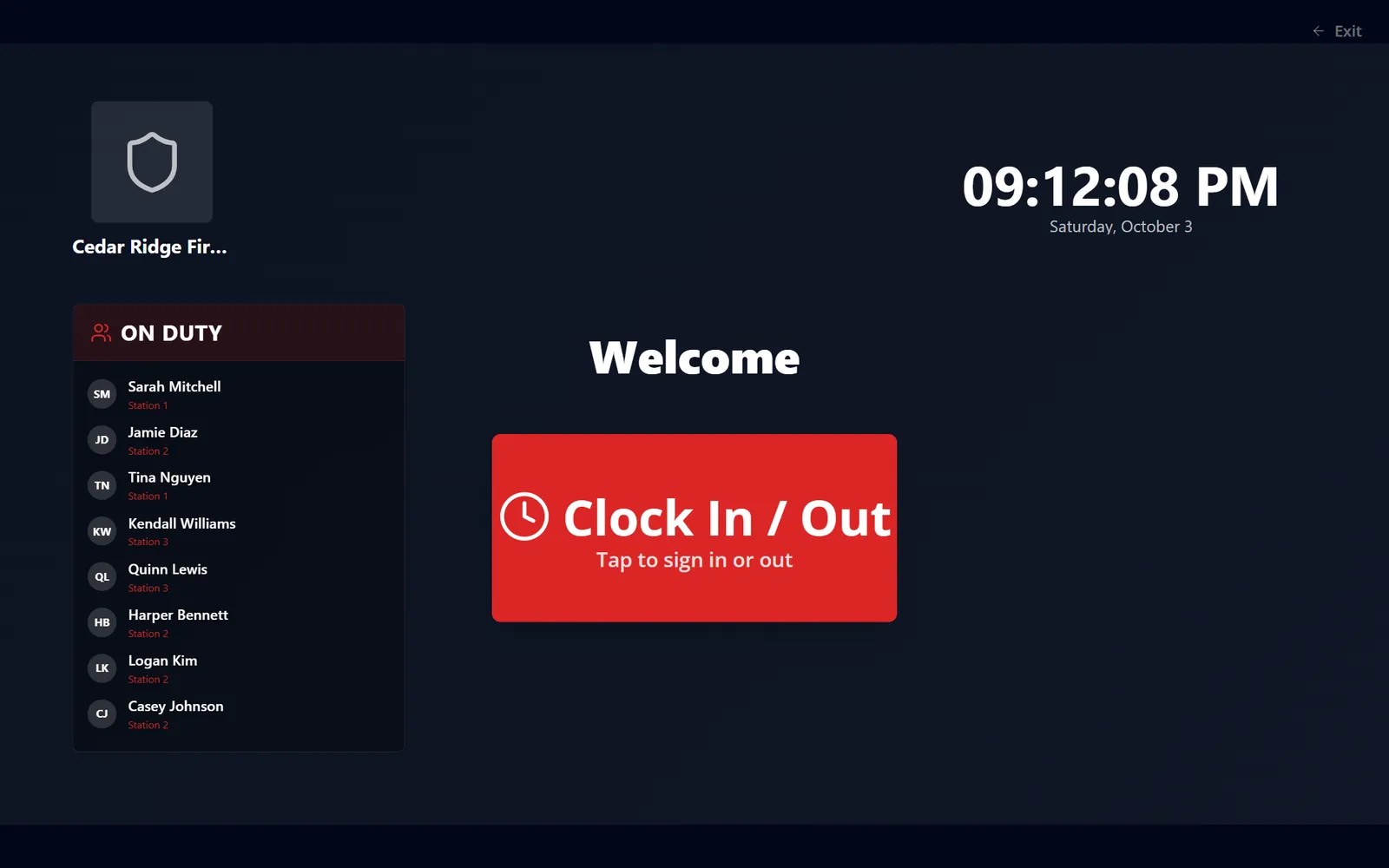
A kiosk by the bay door: tap to clock in, and see who's already on duty.
Geofencing: clock in only at the station
Phone clock-in is the most convenient method, and it's also the easiest to stretch. A member who forgets to clock in on the way to the station, or who taps the button from home "to be ready," turns your duty hours into guesswork.
Geofencing fixes that. You draw an area on a map around each station, usually the building and its lot, and phone clock-ins only go through inside one of those areas. Good geofencing gets four details right:
- It tells members why. "You're 0.4 mi from Station 1" is better than a generic error, and a member standing in the bay shouldn't be refused because the phone guessed wrong.
- It handles weak GPS. Phones indoors are often off by 50 to 200 feet. A location too vague to judge should be flagged as imprecise, with a prompt to turn on precise location, not quietly passed or failed.
- It never traps anyone on the clock. Clock-out should work from anywhere, because a member toned out to a call can't walk back to the station to stop the timer.
- It reads location once, at the punch. The time clock needs to know where a member clocked in, not where they went afterward. Location checks shouldn't track members between punches.
The location also belongs on the record. When an officer reviews a shift, "clocked in at Station 2, accurate to 30 ft" settles questions a timestamp alone can't.
A note on face recognition
Face clock-in is fast and stops buddy-punching, but it's biometric data, and some states regulate it. Ask any vendor exactly what gets stored. A good answer is an encrypted numeric template, never a photo, with enrollment members agree to. We wrote about how we handle it in Your Face Never Leaves the Device, and our biometric policy is public.
The Hard Part Isn't Clocking In. It's Clocking Out.
Ask any officer who has kept time records: the clock-in is rarely the problem. The forgotten clock-out is.
A member gets toned out, leaves the station, goes home, and the entry stays open for 31 hours. Multiply that by a few members a month and your hours report turns into fiction.
Good clock in and out software handles it in four ways:
- It flags entries left open past your threshold as missing clock-outs instead of silently counting the time.
- It counts problem entries where an officer will see them: missing clock-outs, unusually long shifts, overlapping entries, and flagged punches.
- It lets an authorized officer correct the time with a note, so the fix is documented instead of quietly overwritten.
- It keeps the history of every change, so you can show what was entered, what was corrected, and by whom.
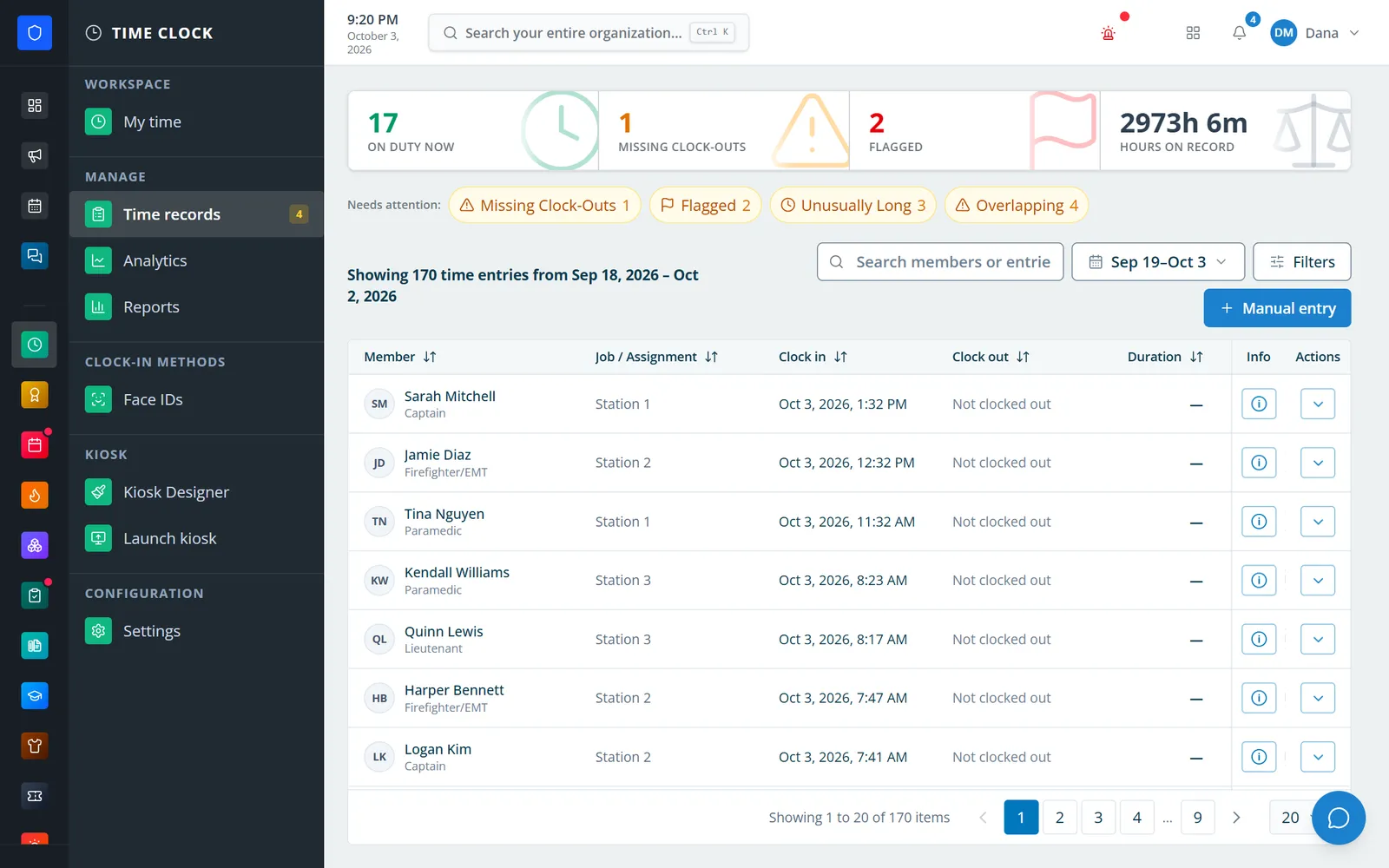
Problem entries counted at the top, one click to filter, and who's on duty right now.
Be wary of tools that "fix" missed clock-outs by closing them automatically at a set time. It looks tidy, but the hours it records are a guess, and a guess is hard to defend in a payroll dispute or an injury claim.
Know What the Hours Were For
"Eight hours" doesn't tell you much. Eight hours of station duty, eight hours of training, and eight hours on a paid event detail can count toward very different things.
That's why fire department time clock software should have members pick a job when they clock in, such as Station Duty, Training, Standby, or Event Detail. The department should control which roles can pick which jobs, at which stations, and on which days.
Keep availability separate from hours, too. A status like In Service, On a Call, or Out of Service tells officers where someone is. It shouldn't open or close a time entry.
And use the moment of clock-in. If there's a new policy or safety bulletin members must read, holding clock-in until they've acknowledged it is the most reliable way to make sure it actually gets read.
What to Do With the Hours Once You Have Them
Clean hours only help if they go somewhere. These are the places they should flow without anyone retyping them.
- Points, credits, and retention programs. Duty and training hours can award credit automatically, so volunteers see their progress without filling out another form. Our post on making volunteer service visible covers how to build a program members care about.
- Payroll and stipends. Completed, approved entries should move into a pay period for review, not get re-keyed from a printout.
- Staffing and the station board. Officers should be able to see who's on duty right now, at every station.
- Reports for the chief, the board, and grant applications. Total hours, members participating, and clock-out compliance answer "how active is this department?" with numbers instead of estimates. Our fire department grants guide covers where that data helps.
- Proof of duty. If a member is injured, a timestamped entry with a job and a station is far stronger than a name on a sheet.
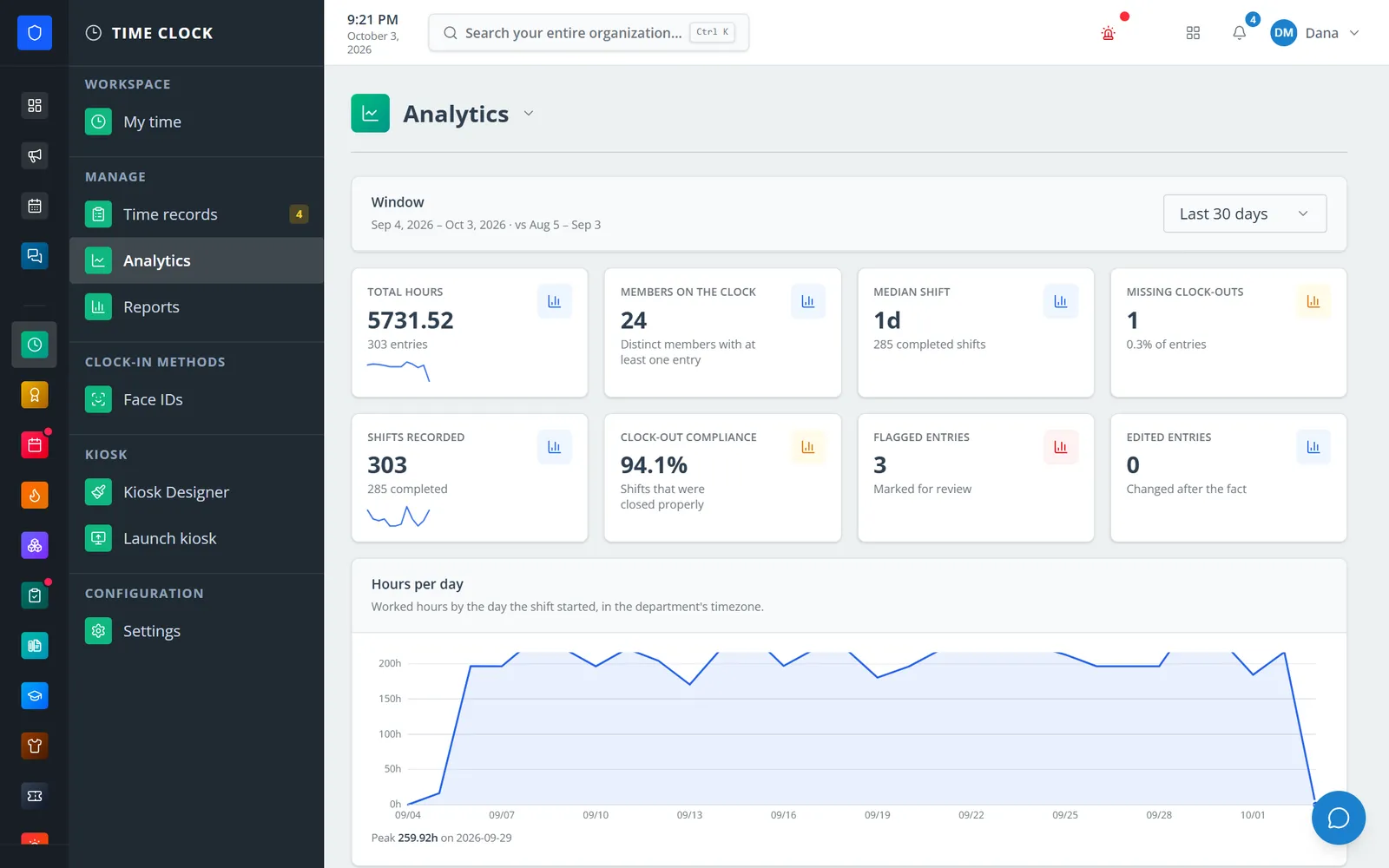
Hours per day and clock-out compliance, compared with the prior period.
9 Things to Look For in Fire Department Time Clock Software
Use this as a checklist when you compare tools.
- More than one way to clock in: portal, phone, and a station kiosk, with PIN or face options.
- Geofencing for phone clock-in, with an area around each station, a clear distance when someone is outside, and location saved on every punch.
- A job on every entry, limited by role, station, day, and how many people can hold a job at once.
- A missed clock-out queue that surfaces open, overlapping, and unusually long entries.
- Corrections with notes and a full edit history. Nothing should change without a record of who changed it and why.
- Members can see their own time, including a live on-duty timer and their history, so they catch mistakes before you do.
- Hours that flow into credits and payroll without exporting and re-importing a spreadsheet.
- Reports you can export to PDF or CSV for audits, boards, and grant applications.
- One login for everything else. A time clock that lives in a separate app from the schedule, training records, and announcements is one more place to check.
For the bigger picture on choosing department software, see our Fire Department Software Buyer's Guide.
How to Roll Out a Time Clock Without a Revolt
Members push back on anything that feels like being watched. Roll it out as something that makes their service count, not as surveillance.
1. Explain the why first
Tell members what the hours are for: points, retention awards, proof of duty, staffing, and pay where it applies. "So your hours finally count" lands better than "so we can track you."
2. Start with two jobs
Station Duty and Training are enough for the first month. Add more once members are used to picking one.
3. Put a kiosk by the door
The easiest clock-in is the one members walk past. A tablet or screen at the bay door gets more use than any reminder.
4. Pick a go-live date and retire the sheet
If the paper sign-in sheet stays on the wall, people will keep using it. Take it down on day one.
5. Work the missed clock-out list every week
The first few weeks will be messy. Ten minutes a week fixing open entries builds the habit, and the list gets shorter fast.
6. Show members their numbers
When members can see their own hours and progress, they start clocking in without being told. That's when you know it worked.
Where Station Clipboard Fits
The Station Clipboard Time Clock is clock in and out software built for fire and EMS departments. Members clock in from the portal, a dashboard widget, their phone, or a station kiosk with a 4 to 8 digit PIN or Face ID, and only an encrypted face template is stored, never a photo.
Geofencing is built in. Draw up to 25 clock-in areas on a map, from 250 feet to a mile around each station, and turn on "Only at clock-in areas." Portal and phone clock-ins then only go through inside an area. A member outside sees exactly how far away they are, a location too vague to trust asks them to turn on precise location, and the area picks the shift's station automatically, so nobody clocks in at the wrong one. Clock-out still works from anywhere, and every punch keeps its location, so Time records show a pin and a line like "At Station 1 · accurate to 30 ft."
You also design the kiosk screen on a 1920×1080 canvas with your department's logo, set up jobs limited by role, station, day, and headcount, and work an attention queue of missing clock-outs and flagged, unusually long, and overlapping entries. You can even hold clock-in until required reads are acknowledged.
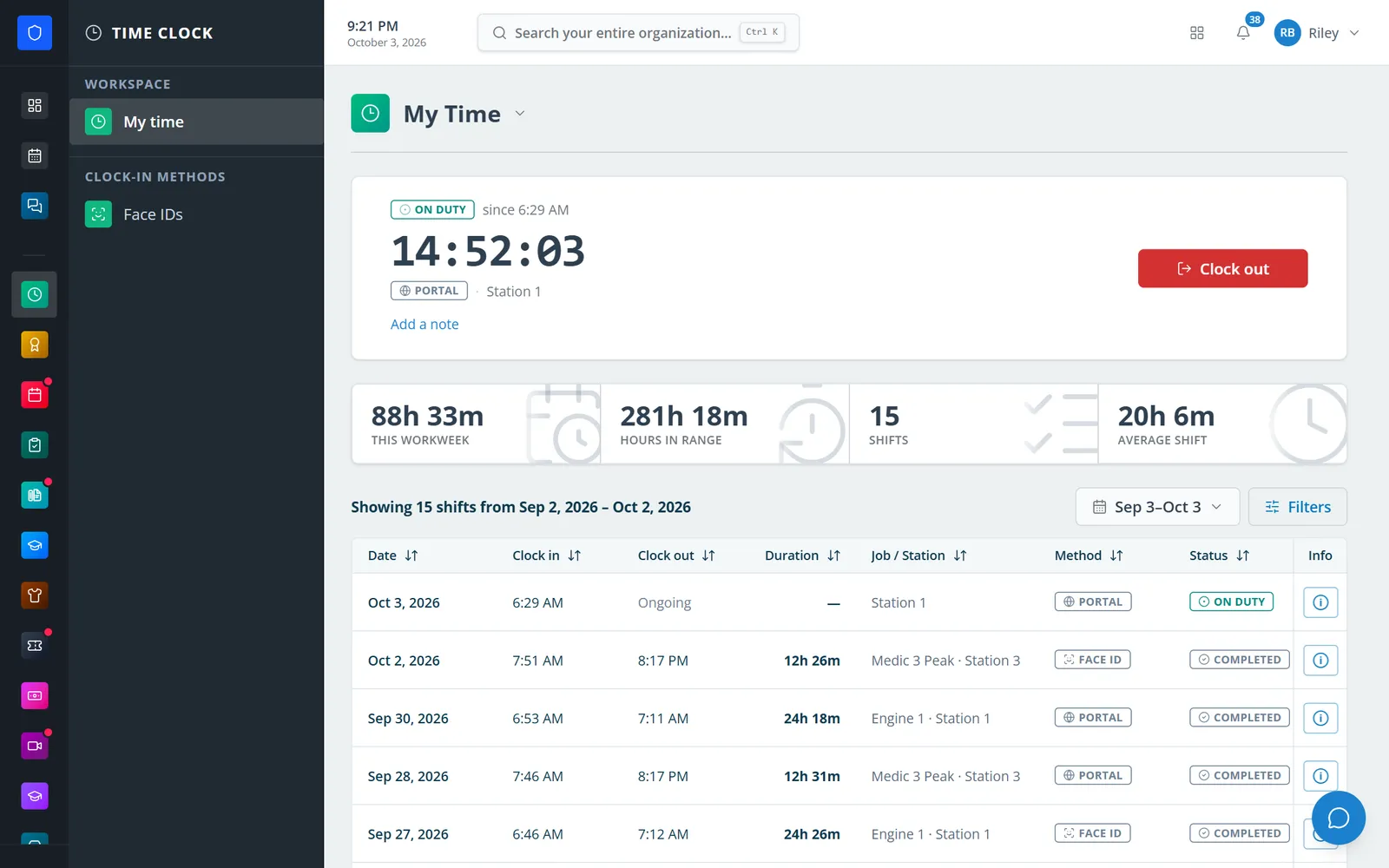
Members see their own on-duty timer, hours this workweek, and every shift with its job and method.
Because it's part of the Department Portal, the hours don't stop at the time clock:
- Credits can award credit from Time Clock shifts automatically, with caps and duplicate prevention.
- Payroll can bring completed entries into a pay period for review and approval, using FLSA 7(k) work periods.
- Station Board can put On Duty Now next to Today's Schedule on the station TV, and Scheduling covers the schedule itself.
For setup details, start with these Help Center guides: Clock in, clock out, and correct time records, Configure Time Clock jobs and clock-in rules, Build and launch a station Time Clock kiosk, and Correct a time entry and resolve a missed clock-out.
Want to see it with your department's own jobs and stations? Contact us and we'll walk through it with you.
Frequently Asked Questions
What is the best way to track volunteer firefighter hours?
Use a time clock members can reach from a phone, the department portal, or a station kiosk, and have them pick a job such as station duty or training when they clock in. Each entry should keep an edit history, and missed clock-outs should be flagged for an officer to correct. The hours can then feed points, credits, and retention programs automatically.
Do volunteer firefighters need to clock in and out?
No federal rule requires volunteers to clock in, but most departments track volunteer hours anyway. The records support points and retention programs, annual reports and grant applications, staffing visibility, and proof that a member was on duty if they're injured.
Can volunteer firefighters be paid by the hour?
Paying volunteers by the hour can put their volunteer status at risk. Under federal rules, volunteers can receive expenses, reasonable benefits, or a nominal fee, but the fee can't substitute for wages or be tied to productivity. The Department of Labor has generally treated a fee of up to about 20 percent of what the department would pay an employee for the same work as nominal. Check with your attorney before setting up any payment.
What is the 7(k) exemption for firefighters?
Section 7(k) of the FLSA lets public agencies pay fire protection employees overtime on a work period of 7 to 28 days instead of a 40-hour workweek. In a 28-day work period, overtime is owed after 212 hours, and the threshold scales down for shorter periods, such as 106 hours in 14 days.
How long should a fire department keep time records?
Federal rules require employers to keep payroll records for at least three years and the time cards and schedules behind them for at least two years. State law, insurers, and retention programs can require longer, so many departments keep time records in their software indefinitely.
How do you handle a forgotten clock-out?
The time clock should flag any entry left open past your threshold as a missing clock-out. An authorized officer then closes it with the correct time and a note explaining the correction, and the change stays in the entry's history. Avoid automatic clock-outs at a fixed time, because the hours they record are a guess.
Can a fire department time clock use GPS or geofencing?
Yes. With geofencing, the department draws an area around each station, and phone or portal clock-ins only go through when the member's location is inside one. Good systems show members how far away they are when they're outside, flag locations too imprecise to judge, still allow clock-out from anywhere, and read location only at the moment of a punch instead of tracking members.
Is face recognition safe for a fire station time clock?
It can be, if the system stores only an encrypted face template instead of photos, members agree to enroll, and the department has a written biometric policy. Some states regulate biometric data, so check your state's rules and offer a PIN for members who prefer not to enroll.
Does EMS count as fire protection under the FLSA?
Sometimes. EMTs and paramedics count as fire protection employees under Section 7(k) only when they meet specific conditions, including being trained in fire suppression, having the legal authority to fight fires, and being employed by a fire department. Otherwise, standard 40-hour overtime rules generally apply.