Your Face Never Leaves the Device: How Station Clipboard Secures Biometric Data
How StationClipboard protects biometric data in Face Clock-In — from local face processing to encrypted storage and department-level isolation.
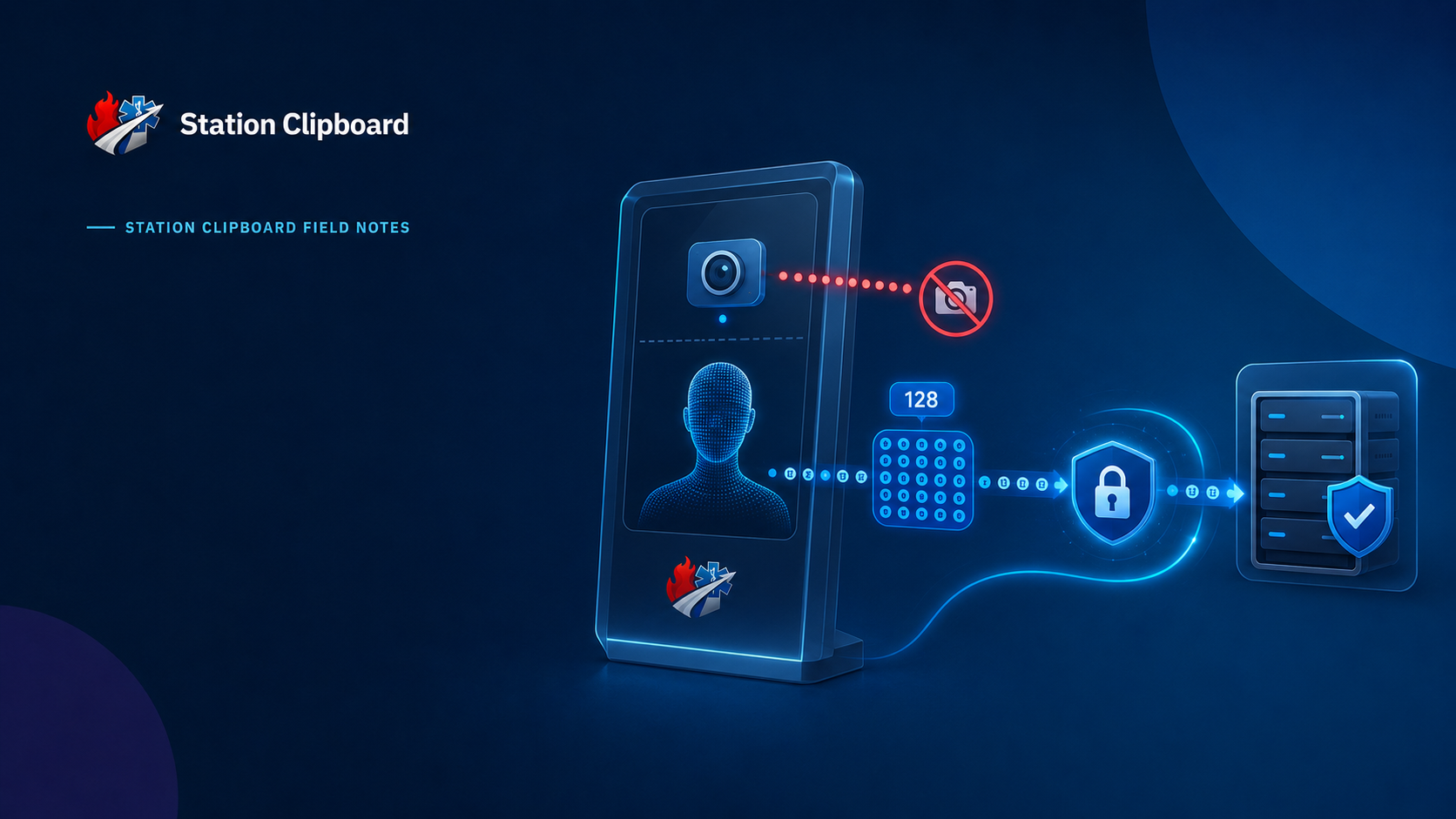
What happens when a firefighter looks at the StationClipboard kiosk to clock in?
It's a fair question.
A camera turns on. The system recognizes the member. The clock-in happens in seconds.
But somewhere in the back of your mind, there is probably another question:
"Okay... but where did my face go?"
That's exactly the question we wanted to answer when we built Face Clock-In.
And the answer is probably simpler than you expect:
Your face doesn't go anywhere.
The camera image stays on the device.
StationClipboard never receives the photograph.
What our servers receive is a mathematical representation of the face — an encrypted 128-value face descriptor used for matching.
That distinction is important.
And we're going to show you exactly how it works.
First, Let's Talk About What We Don't Store
Before explaining what a face descriptor is, let's start with what isn't sitting in a StationClipboard database.
| Data | Stored by StationClipboard? |
|---|---|
| Enrollment photograph | No |
| Clock-in photograph | No |
| Enrollment video | No |
| Clock-in video | No |
| Camera frames | No |
| Plaintext biometric descriptor | No |
| Biometric data sent to a third-party recognition service | No |
| Cross-department biometric index | No |
There isn't a folder somewhere containing everyone's enrollment photos.
There isn't a collection of webcam recordings.
There isn't a searchable database of firefighter photographs.
We designed the system so we never have those things in the first place.
So What Does StationClipboard Store?
This is where things get a little more technical.
When the camera sees a face, the browser processes the image locally on the device.
The face-recognition model doesn't send the photograph to our servers.
Instead, it produces a mathematical representation called a face descriptor.
Think of it as turning visual information into numbers that can be compared.
A simplified representation looks something like this:
face_training_profiles.descriptor

128 float32 values

-0.142
 0.038
 0.091
-0.067
 0.113
-0.024
 0.006
-0.155
 0.072
-0.019
 0.128
 0.044
-0.088
 0.061
-0.132
 0.017
...
64 more
Those numbers are not a photograph.
They are the output of the face-recognition model — a numerical representation that allows StationClipboard to compare a newly scanned face against an enrolled profile.
But here's an important distinction:
We don't consider a face descriptor "harmless" just because it isn't a photograph.
Biometric information is sensitive information.
So we protect the descriptor accordingly.
The Journey of a Face
There are three important stages.
And the first one is the most important.
01 — Your Camera Stays on Your Device
When a member looks at the kiosk, the browser accesses the camera.
The face-recognition model runs inside the browser.
The camera frame is processed locally.
That means the actual image of the firefighter never needs to travel to StationClipboard.
The flow looks like this:
Camera
   │
   ▼
Browser on the kiosk
   │
   │  Face processing happens HERE
   │
   ├───────────────X──────────────► StationClipboard
   │             No photo
   │
   ▼
128-value descriptor
The image stays on the device.
No photograph is uploaded.
That's not a privacy policy statement.
That's an architectural decision.
02 — The Descriptor Is Encrypted
Once the browser has generated the descriptor, the descriptor — not the photograph — can be sent to StationClipboard.
Before it rests in our database, it is encrypted using:
AES-256-GCM
The encryption key is maintained separately from the database.
So even if someone were somehow able to obtain a database copy, they would not simply open a table and see readable biometric descriptors.
| Layer | What Happens |
|---|---|
| Camera | Image remains on the device |
| Browser | Face processing happens locally |
| Network | Descriptor is transmitted instead of the photograph |
| Database | Descriptor is encrypted |
| Encryption | AES-256-GCM |
| Encryption Key | Maintained separately from the database |
There's an important principle behind this:
Protect the data even if another layer eventually fails.
03 — Matching Happens on the Server
This is where Face Clock-In actually recognizes the member.
When someone clocks in, their device creates a fresh descriptor from the face currently in front of the camera.
StationClipboard compares that descriptor against the department's enrolled profiles.
The stored descriptors are decrypted only as needed for the comparison and exist in server memory during that operation.
And then comes another important security decision:
The enrolled descriptors are never sent back to the kiosk.
The kiosk gets the result.
It doesn't get the department's biometric database.
Why We Built It This Way
A fire station is not a corporate office.
A kiosk might be sitting in:
- A station bay
- A lobby
- A hallway
- A common area
- An apparatus floor
It may be used by dozens of people.
It may be left unattended.
And, realistically, a physical device can eventually be stolen.
So we designed the system around that possibility.
What if the kiosk disappears?
The kiosk doesn't contain your department's enrolled faceprints.
What if someone gets a database backup?
The descriptors stored there are encrypted.
What if someone asks us for a member's enrollment photo?
We don't have one.
That's the point.
The Security Model at a Glance
| Scenario | What StationClipboard Has Designed For |
|---|---|
| Kiosk is stolen | Enrolled descriptors aren't stored on the kiosk |
| Database backup is exposed | Biometric descriptors are encrypted |
| Member enrolls | Original photograph stays on the device |
| Member clocks in | Clock-in image isn't stored |
| Another department is accessed | Profiles remain scoped to their department |
| Member leaves | Their biometric profile is removed |
| Administrator resets profile | Stored descriptor is removed |
Your Department's Biometrics Stay Your Department's
This is another part of the system that we consider extremely important.
A member's biometric profile is associated with the department where it was enrolled.
Matching is department-scoped.
We don't operate a giant cross-department face database.
There isn't a system where Department A can search for a firefighter who enrolled with Department B.
There isn't a shared biometric directory.
There isn't a product feature where your department's roster becomes someone else's lookup table.
Your department's biometric data belongs to your department.
| Question | Answer |
|---|---|
| Can Department A search Department B's profiles? | No |
| Is there a shared face index? | No |
| Are profiles department-scoped? | Yes |
| Does one department's enrollment become another department's enrollment? | No |
Nobody Gets Enrolled Automatically
There's another important part of the design:
Face Clock-In is optional.
A department has to enable the feature.
A member has to enroll.
And departments can choose how that enrollment works.
For example, a department can require administrator approval before a biometric profile becomes available for clock-in.
Members who don't want to use Face Clock-In can continue using other available clock-in methods.
| Method | Requires Face Enrollment? |
|---|---|
| PIN | No |
| Username & Password | No |
| Face Clock-In | Yes |
Face is an option — never the only door.
What Happens When Someone Leaves?
Biometric data shouldn't live forever just because someone once used a feature.
That's why profile management is built into the system.
An administrator can reset a member's Face Clock-In profile.
When that happens:
- The stored descriptor is removed.
- The member returns to an un-enrolled state.
- The member can enroll again if the department permits it.
When a member is removed from the department, their associated biometric descriptor is removed along with their record.
The lifecycle is simple:
Enroll
  │
  ▼
Local camera processing
  │
  ▼
128-value descriptor
  │
  ▼
AES-256-GCM encryption
  │
  ▼
Encrypted profile
  │
  ▼
Server-side matching
  │
  ▼
Clock-in
  │
  ▼
Profile reset / member removal
  │
  ▼
Descriptor removed
There is no reason for an old biometric profile to sit around after it is no longer needed.
We're Not Going to Tell You Something We Can't Prove
This part matters to us.
A lot of technology companies make very strong claims about biometric data.
You may hear things like:
"A face embedding can never be turned back into a face."
We're not going to make that claim.
Research into biometric embeddings and reconstruction is ongoing.
The responsible approach is to treat a face descriptor as sensitive biometric information, regardless of whether it looks like a photograph.
So our security story isn't:
"Don't worry, it's just numbers."
Our security story is:
"It's sensitive data, so we designed the system to protect it."
That means:
- The original face image stays on the device.
- No enrollment photograph is stored.
- No clock-in photograph is stored.
- Descriptors are encrypted at rest.
- Encryption keys are maintained separately from the database.
- Profiles are scoped to a department.
- Enrolled descriptors aren't returned to kiosks.
- Administrators can reset biometric profiles.
- Member removal removes associated biometric data.
- We don't send enrolled faces to a third-party facial-recognition service.
Those are things we can actually point to in the architecture.
Why This Matters for Fire Departments
We're not building a biometric system for a laboratory.
We're building a time clock for firefighters and EMS personnel.
The person standing at the kiosk might be:
Wearing gloves.
Carrying equipment.
Wearing a hood.
Walking in for a shift at 5:30 AM.
Coming back from a call.
Trying to clock in without taking half their gear off.
Face Clock-In makes that interaction fast.
But making something convenient doesn't mean we get to be careless with the data behind it.
That's why we took the approach we did.
Process the image locally.
Store only what is necessary.
Encrypt what must be stored.
Keep departments isolated.
Don't put enrolled biometric data on the kiosk.
Remove profiles when they're no longer needed.
That's the philosophy behind Face Clock-In.
What We Store vs. What We Don't
If you remember one table from this entire article, make it this one:
| Stored | Not Stored | |
|---|---|---|
| Face descriptor | Yes | |
| Enrollment status | Yes | |
| Enrollment metadata | Yes | |
| Original face photograph | No | |
| Clock-in photograph | No | |
| Camera video | No | |
| Raw camera frames | No | |
| Plaintext descriptor at rest | No | |
| Cross-department face index | No |
That's the difference between building a biometric feature and building a biometric repository.
We chose the former.
Security Isn't a Checkbox
There isn't a single button called "Secure Biometrics."
Good security comes from a series of decisions.
Where is the image processed?
On the device.
What leaves the device?
The descriptor, not the photograph.
How is the descriptor stored?
Encrypted.
Who can access another department's profiles?
They can't.
Does the kiosk receive the enrolled database?
No.
Can an administrator remove a profile?
Yes.
Does a member have to use Face Clock-In?
No.
That's what security looks like when it is built into the architecture instead of added as a marketing paragraph afterward.
Questions? Ask Us.
Security questions are welcome.
If your department is evaluating Face Clock-In and wants additional technical information for a security review, reach out to:
support@stationautomations.com
Ask for the StationClipboard Engineering Team.
We'd rather explain exactly how something works than ask you to simply trust that it is secure.
StationClipboard Engineering
Building software for the work fire departments actually do.
Last updated: August 2026