Fire Department Software: The 2026 Buyer's Guide
What fire department software should actually do in 2026, what to ask before you sign, and how volunteer, combination, and career departments can replace the spreadsheets, group texts, and paper binders without starting over.
Most fire departments don't have a software problem.
They have a too-many-places problem.
The schedule is in one app. Training hours are in a spreadsheet. Truck checks are on a clipboard in the bay. Announcements go out by group text, then get repeated on Facebook, then get asked about again at the next meeting. Incident reports live somewhere else entirely, and the person who knows how all of it fits together is usually the chief, the training officer, or the one member who is good with computers.
That works until it doesn't.
Fire department software should bring those pieces into one place your members will actually open. This guide covers what to look for, what to ask before you sign anything, and how to switch without losing a year of records along the way.
Quick answer: The best fire department software for your department is the one that covers scheduling, training records, apparatus and equipment checks, NERIS incident reporting, and department communication in one system, works on members' phones, and lets you turn off what you don't need. Start with your biggest daily headache, not the longest feature list.
What Is Fire Department Software?
Fire department software is the system a department uses to run its non-emergency operations: people, schedules, training, equipment, reporting, and communication.
It is not CAD. Dispatch software decides who goes to the call. Department software handles everything around the call: who is on shift, whether the engine was checked this morning, whether the crew is current on their certifications, and whether the incident report reaches NERIS on time.
Most departments start out stitching that together from free tools. The cost isn't the subscription you avoided. It's the hours your officers spend chasing, re-typing, and reconciling.
Signs Your Department Has Outgrown Spreadsheets and Group Texts
You probably don't need a consultant to tell you. If three or more of these sound familiar, it's time:
- Members ask "Am I on this weekend?" in the group chat every week.
- Your training officer rebuilds the same hours report before every audit or ISO review.
- Nobody can say with confidence when the SCBA on Engine 2 was last checked.
- Announcements get lost between texts, email, Facebook, and the whiteboard.
- Incident reports are written in one system and re-typed into another.
- Grant applications take weeks because the numbers live in five places.
- When one officer steps down, their spreadsheets leave with them.
None of those are about technology. They're about one dependable source of truth.
What Fire Department Software Should Do in 2026
Feature lists all look the same on a vendor website. Here's what actually matters in day-to-day use.
1. Scheduling members can manage from their phone
Scheduling is the module members touch most, so it has to be easy for them, not just for the officer who builds it.
Look for:
- Members entering availability from their phone
- Rotations and shift templates you set up once
- Seat-by-seat staffing (driver/operator, officer, firefighter, EMT) so you can see gaps, not just headcount
- Trades and time off that go through an approval instead of a text thread
- A way to fill open shifts without calling down a list by hand
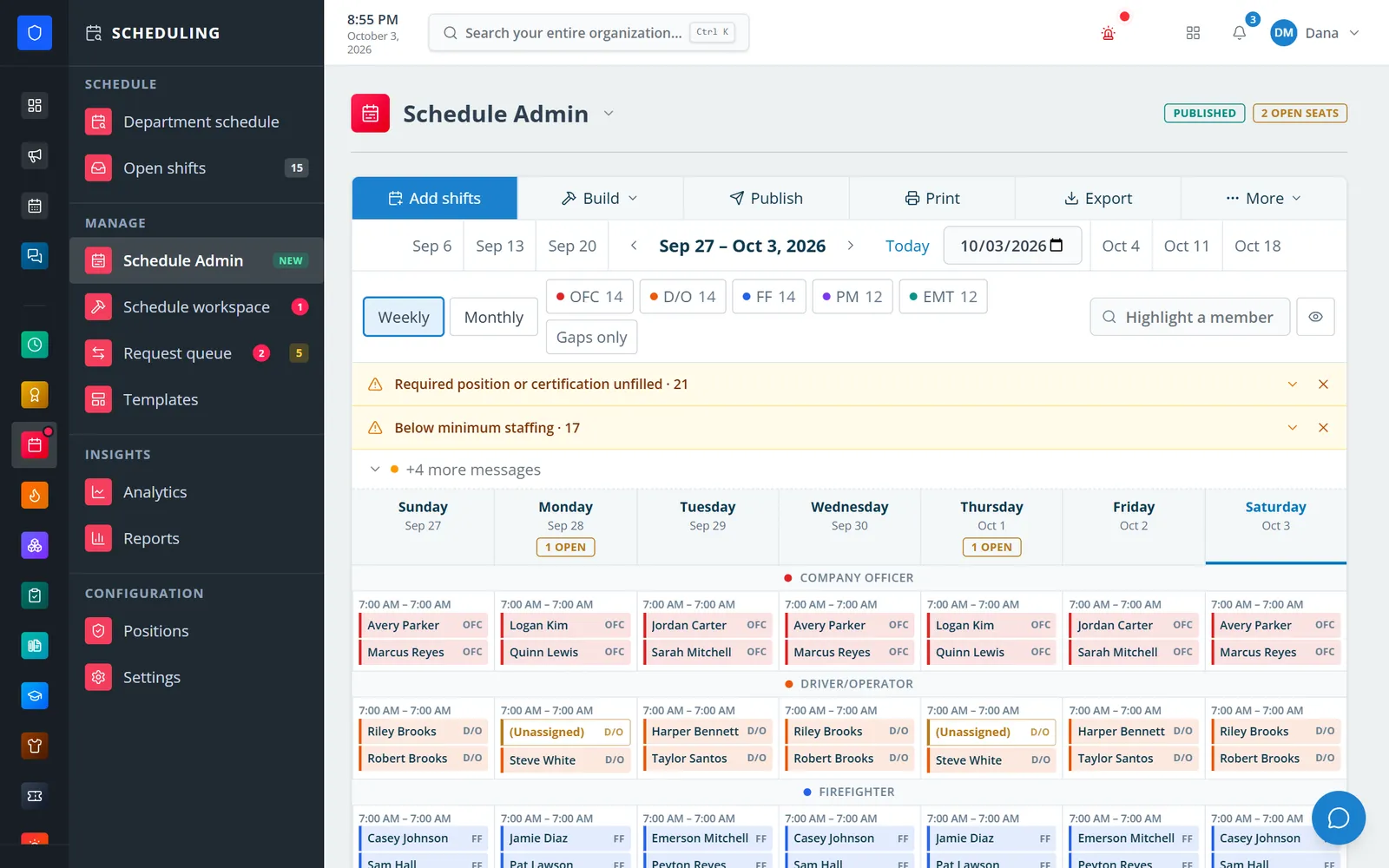
A seat-by-seat schedule makes staffing gaps obvious before the shift starts, not during it.
2. Training records that are audit-ready without a rebuild
Training records are where departments lose the most time when an audit, ISO review, or grant application lands.
Look for:
- Training events with rosters and hours
- Members logging their own drills and CE, with officer approval
- Certifications with expiration dates and reminders
- Requirements by role, so a firefighter and an EMT are measured against the right standard
- A readiness or compliance view that answers "who is behind?" in one screen
- Exports you can hand to an auditor as-is
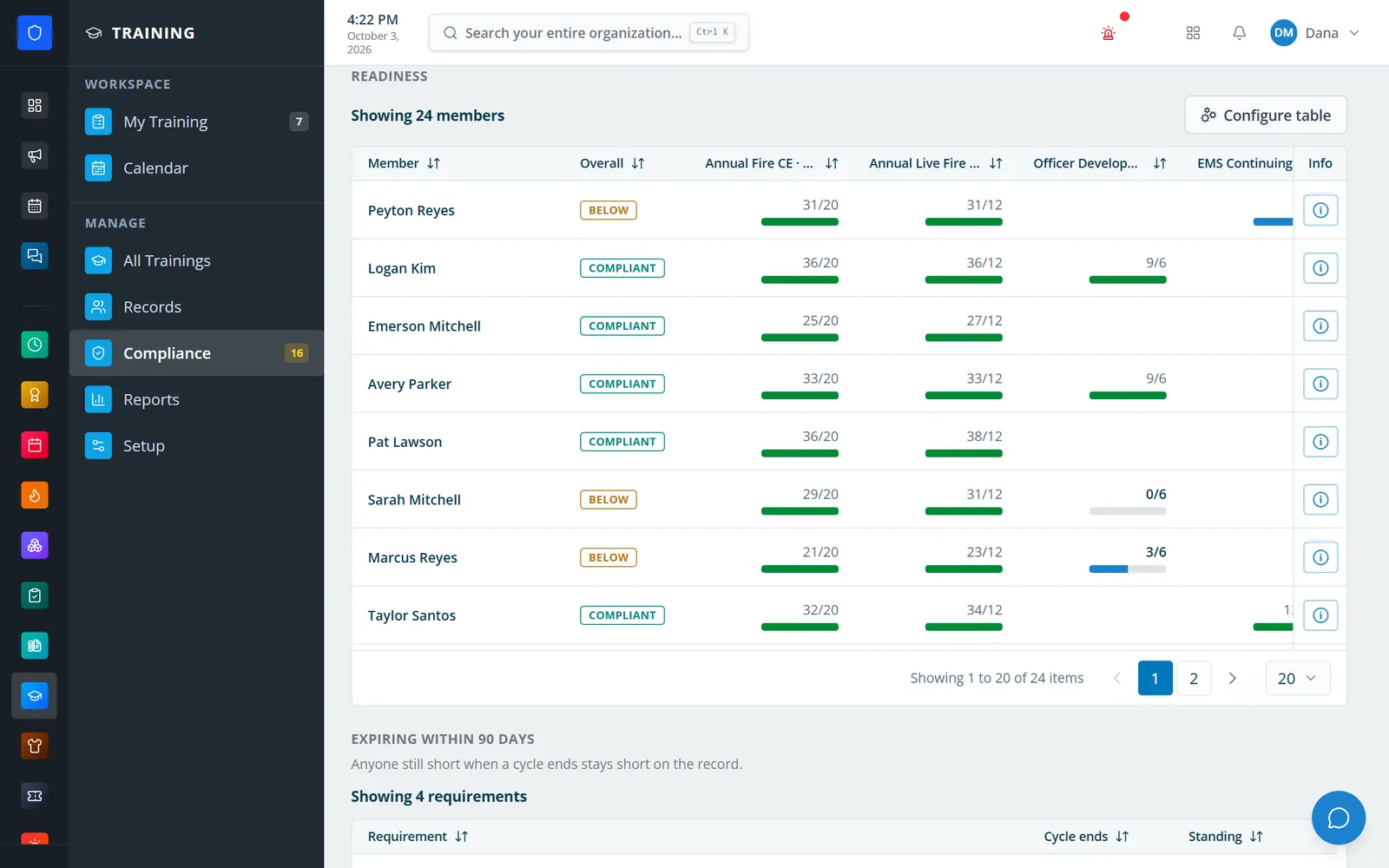
A readiness matrix replaces the spreadsheet your training officer rebuilds every quarter.
3. Apparatus, SCBA, and equipment checks that don't stop at the clipboard
A paper truck check proves somebody walked around the truck. It rarely proves anyone fixed what they found.
Look for:
- Truck, SCBA, and PPE checks that run on a phone or tablet
- More than one member able to work the same check together
- Missed checks that show up on their own, instead of someone noticing weeks later
- Failed items that turn into a repair alert someone owns
- Equipment records with expirations, recurring maintenance, and history
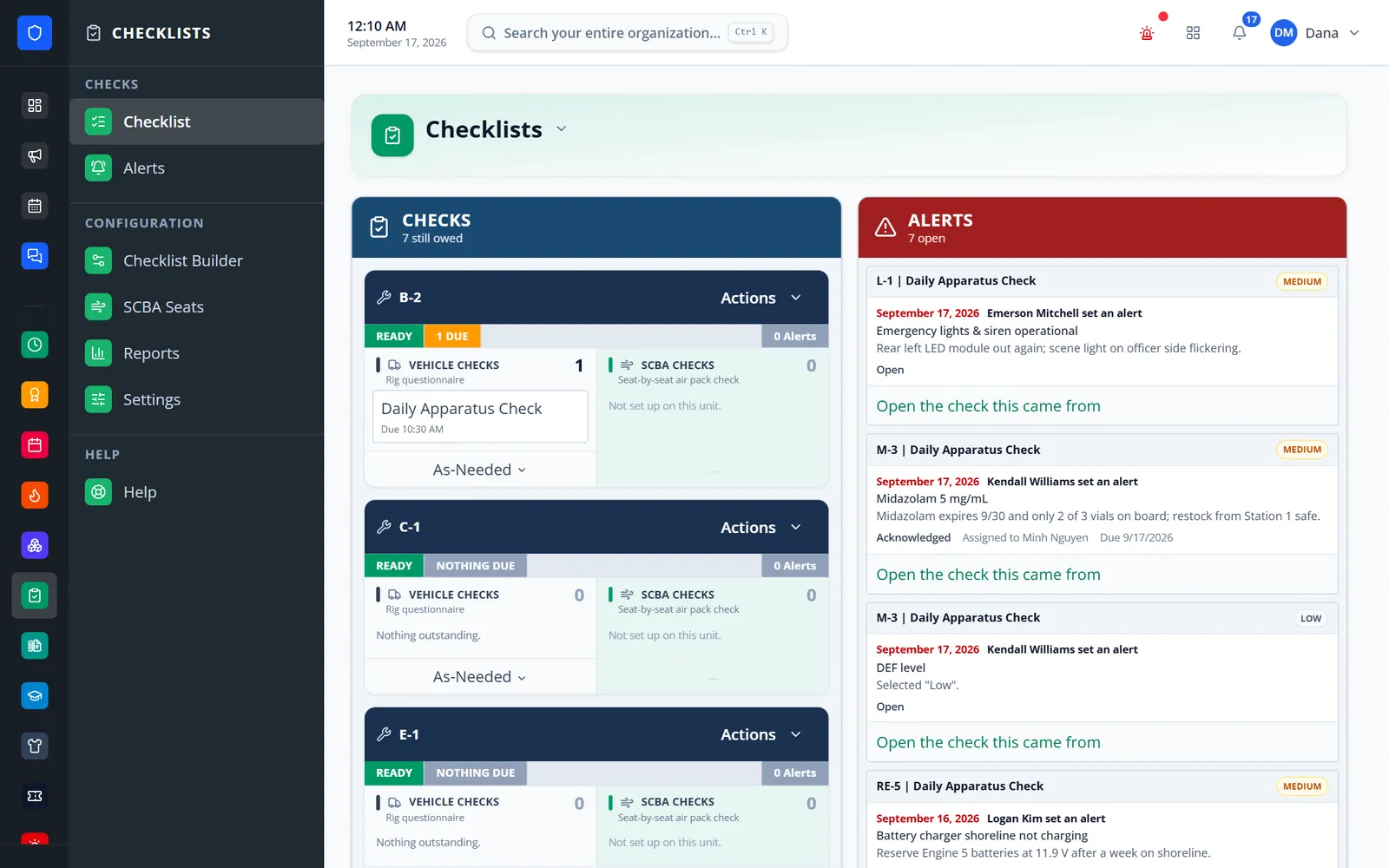
The question isn't "did someone do the check?" It's "what failed, and who is fixing it?"
4. NERIS incident reporting built in
NFIRS has been replaced by NERIS as the national fire incident reporting system. If you haven't read the background, start with our guide, NERIS vs. NFIRS: What Changed for Fire Departments?
For software, that means two questions:
- Can it submit to NERIS directly? Exporting a file you then upload somewhere else is extra work every single call.
- Does it check the report before you send it? Catching a missing field before submission is far easier than fixing a rejected report afterward.
Bonus points if reports can start from your CAD calls, so nobody re-types the address, time, and incident number.
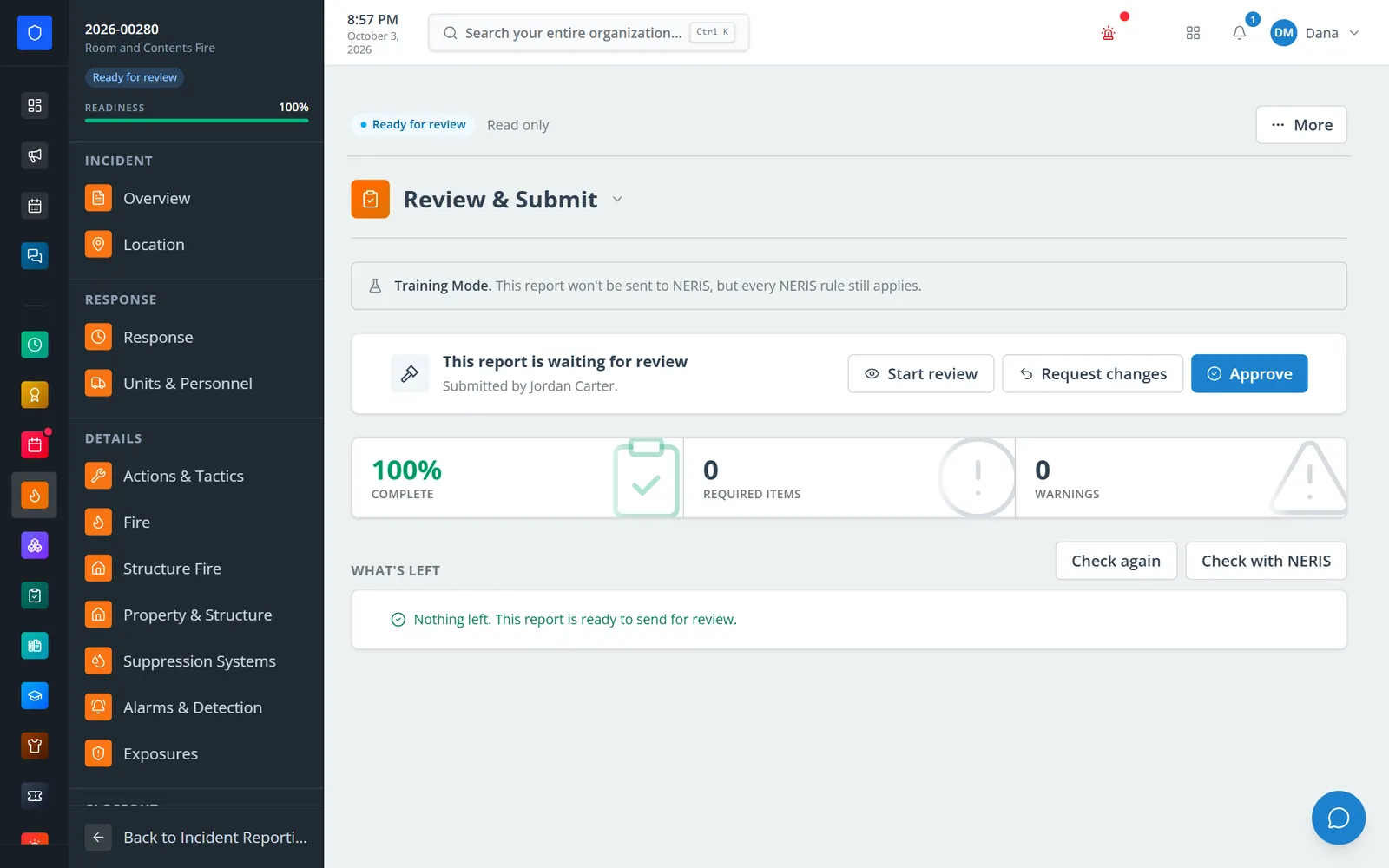
A readiness check catches problems before the report leaves the building.
5. Department communication with one official channel
When everything is posted everywhere, members stop reading. We wrote about this in When Everything Is Important, Where Are Members Supposed to Look?
Look for:
- Official announcements kept separate from everyday conversation
- A shared department calendar
- Push notifications to members' phones, kept to what matters, so the important ones still get noticed
- Chat that is controlled by role, so members can talk without the officer group text getting mixed in
6. Time and attendance that feeds everything else
If you track hours for pay, stipends, points, or retention programs, the clock-in method matters. Look for clock-in from a phone or the portal, a station kiosk for members who don't want an app, and hours that flow into credits or payroll records without being re-typed. If you're building a points program, our post on making volunteer service visible covers how to set one up so members actually care about it.
7. A dashboard that tells each member what's waiting on them
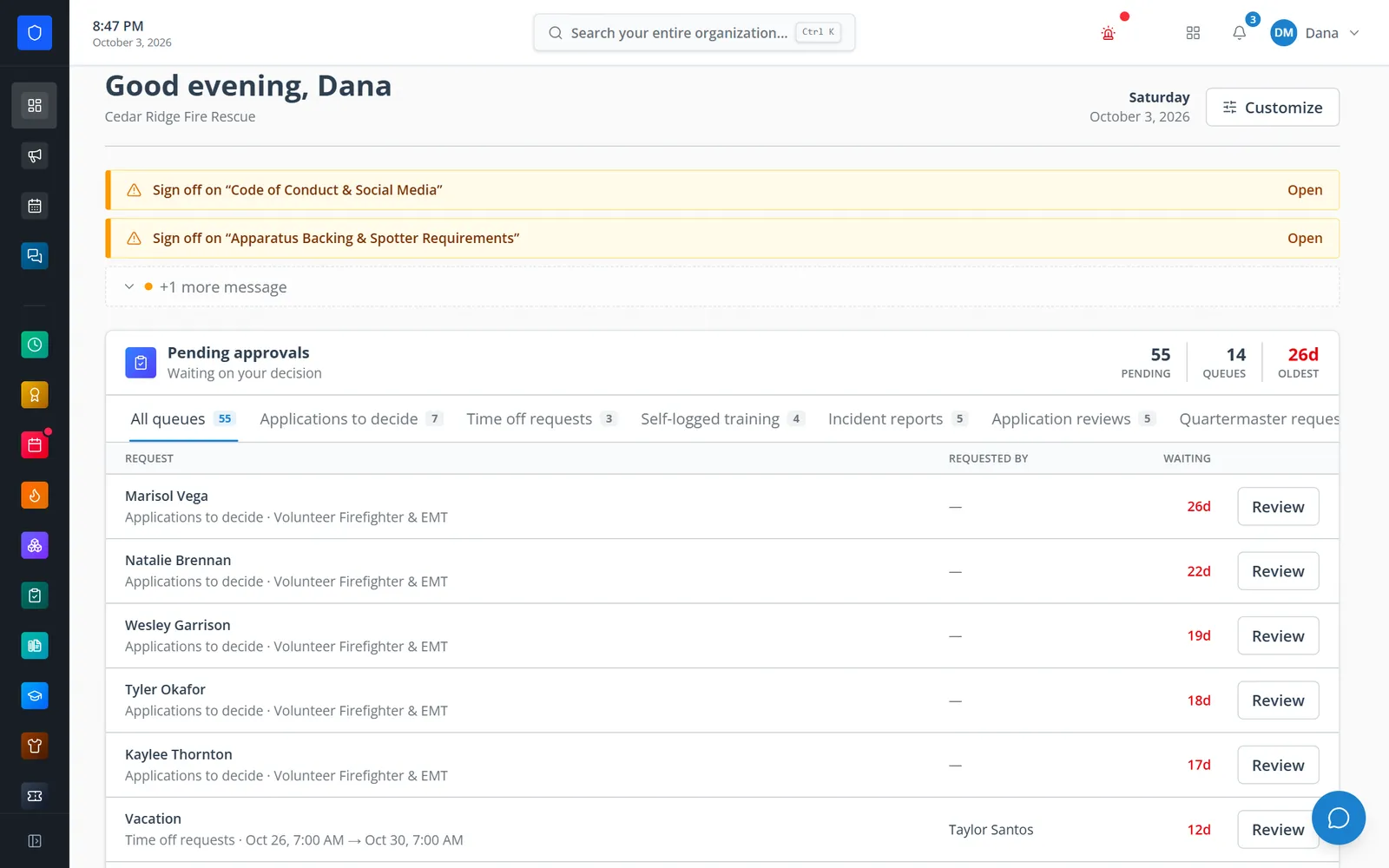
The best test of department software is simple: when a member signs in, do they know what they need to do?
A good dashboard shows their next shift, their overdue training, their unsigned policy, and their open check, not a wall of everything happening in the department.
Questions to Ask Before You Sign
Demos are designed to look good. These questions get past the demo.
| Question | Why it matters |
|---|---|
| Can we turn off modules we don't use? | A volunteer department running three modules shouldn't wade through twenty-five menus. |
| Does it work on members' phones? | If members won't open it, the officers end up re-entering everything. |
| Does it submit to NERIS directly? | Manual uploads add work to every call, forever. |
| Who controls permissions? | Officers, members, and admins need different access. Roles should be yours to define. |
| How do we get our data in? | Ask specifically about member rosters, certifications, and equipment. |
| How do we get our data out? | You should be able to leave with your records. |
| What happens when we need something it doesn't do? | Some vendors say "not on the roadmap." Some will build it. |
| Is it one system or several products bolted together? | Separate logins and separate data are the problem you're trying to solve. |
| How is member data protected? | Ask about permissions, audit trails, and how biometric data (like face clock-in) is handled. |
| Who answers when something breaks? | A support queue three time zones away is different from people who know the fire service. |
The important part: ask to see your own workflow, not theirs. Bring your actual schedule, your actual truck check, and your actual training requirement to the demo.
Volunteer, Combination, and Career Departments Need Different Things
The same software can serve all three, but the priorities change.
Volunteer departments
The biggest problems are usually retention, availability, and paperwork that falls on two or three people. Prioritize phone-friendly scheduling and availability, simple training logging, points or credits for participation, and recruiting. Keep the setup small. You can turn more on later.
Combination departments
The hard part is two kinds of members under one roof. Prioritize seat-based scheduling that handles paid and volunteer staffing together, time tracking, and permissions that keep the two groups organized without separate systems.
Career departments
The weight shifts to compliance, payroll records, and reporting. Prioritize audit-ready training and certification records, FLSA-aware time and payroll records, NERIS reporting at volume, and equipment and inventory at scale.
How to Switch Without Losing a Year of Records
Switching software is where good intentions go to die. It doesn't have to.
1. Start with one problem
Pick the thing that causes the most pain every week, usually scheduling or truck checks, and start there. Don't launch fifteen modules on day one.
2. Get your roster right first
Members, roles, and contact information are the foundation for everything else. Clean that list before importing anything.
3. Bring forward what you need, archive the rest
You probably need current certifications and expiration dates. You may not need every training sign-in sheet from 2014. Decide what moves and what gets archived as a file.
4. Pick a go-live date and stop the old system
Running two systems in parallel for months guarantees nobody trusts either one. Choose a date, announce it, and point every question to the new system.
5. Train the officers, then the members
Officers need to know the setup side. Members need to know three things: how to sign in, where their schedule is, and where announcements go.
6. Add the next module once the first one sticks
When members open the app without being reminded, you're ready for the next one.
Paying for It
Software is an eligible expense under more programs than most departments realize. Our practical guide to fire department grants covers where to look. Texas departments should also read about the Texas A&M Forest Service HB 2604 reimbursement, which can cover up to $3,000 of Station Clipboard for eligible rural volunteer departments.
As always, check the current program guidance before assuming eligibility.
Where Station Clipboard Fits
We built Station Clipboard because we were tired of watching departments run on seven disconnected tools.
The Department Portal is one system with 28 modules, and you only turn on the ones you need. It covers Scheduling, Training, Time Clock, Checklists for apparatus, SCBA, and PPE, Assets, Incident Command, and NERIS Incident Reporting as an official NERIS integration partner, plus Chat, Recruiting, Payroll records, Budget, and more. It runs in the browser, on iPhone, and on Mac and Windows desktop apps.
And when your department needs something that isn't there, you can request a custom module.
We've been shipping fast. You can follow along in our development updates, like Eight Modules in Thirty-One Days.
Want to see it with your own workflow? Contact us and bring your schedule, your truck check, and your toughest training requirement.
Frequently Asked Questions
What is the best software for a fire department?
The best fire department software is the one your members will actually use. Look for one system that covers scheduling, training records, apparatus checks, NERIS reporting, and communication, works on phones, and lets you turn off what you don't need.
What software do volunteer fire departments use?
Many volunteer fire departments start with spreadsheets, group texts, and free scheduling apps, then move to an all-in-one department platform when the paperwork falls on too few people. Volunteer departments should prioritize phone-friendly availability, simple training logs, and participation tracking.
Is fire department software the same as CAD?
No. CAD (computer-aided dispatch) handles dispatching units to calls. Fire department software handles the department's operations around those calls: staffing, training, equipment checks, incident reporting, and communication. Some department software can import calls from CAD to start incident reports.
Does fire department software need to support NERIS?
If your department reports fire incidents nationally, yes. NERIS has replaced NFIRS, so your incident reporting software should be able to submit NERIS reports directly and check them for errors before they're sent.
How long does it take to switch fire department software?
It depends on how much you turn on at once. Starting with one module, such as scheduling or truck checks, and adding others once members are comfortable is faster and more reliable than launching everything on the same day.
Can grants pay for fire department software?
Sometimes. Technology and operational systems can be eligible under some federal, state, and local programs. Texas rural volunteer fire departments may be able to get reimbursed up to $3,000 for Station Clipboard through the HB 2604 program. Always verify current eligibility with the program.