NERIS Reporting Software: What It Needs to Do and How to Choose One
NFIRS is gone and every incident now goes to NERIS. Here's what NERIS reporting software has to do, the questions to ask every vendor, the mistakes that slow departments down, and how to switch without losing a month of reports.
NFIRS is gone. Every incident your department runs now goes to NERIS.
That part isn't up for debate anymore. What's still up to you is the software in between, and it decides more than most departments expect: whether a report takes ten minutes or an hour, whether the times match CAD, whether a bad report reaches the federal record, and whether the calls nobody wanted to write up ever get written at all.
This guide covers what NERIS reporting software actually has to do, the questions to ask every vendor, the mistakes we see slow departments down, and how to switch tools without losing a month of reports.
Quick answer: NERIS reporting software should send reports directly to NERIS (no file uploads), check every report against NERIS rules before it's sent, start reports from CAD so nobody retypes times and units, ask only the sections each incident type needs, include an officer review step, offer a training mode that doesn't send to the live system, control who can send, and keep your own copies as PDFs and exports. Ask every vendor to show you a report going from a CAD call to an accepted NERIS submission.
Where NERIS Stands Now
If you've been following the transition, here's the short version of where things landed, according to the U.S. Fire Administration:
- January 1, 2026: incident data submission moved exclusively to NERIS. No 2026 incidents go into NFIRS.
- January 31, 2026: the last day to edit 2025 incident records in NFIRS.
- February 2026: NFIRS became unavailable to all users.
USFA pointed departments to onboard to NERIS through the program run by the Fire Safety Research Institute (FSRI), and advised against reporting to NERIS and NFIRS at the same time unless a local or state requirement calls for it.
NERIS isn't NFIRS with a new name. It uses a different data model, which is why software built around NFIRS can't simply relabel itself. Our post on NERIS vs. NFIRS explains the differences in detail.
What NERIS Reporting Software Actually Does
Strip away the feature lists and every NERIS reporting tool does the same six jobs:
- Start the report, ideally from the CAD call instead of a blank form.
- Write it, with sections that match the incident.
- Check it against NERIS rules, before anyone tries to send it.
- Review it, so an officer approves it or sends it back with specific changes.
- Send it to NERIS, and confirm it was accepted.
- Keep it, as a record your department can print, export, and produce on request.
The difference between tools is how much of that work they do for you, and how much they leave to the person typing at the end of a long shift.
12 Things NERIS Reporting Software Should Do
1. Send directly to NERIS
Reports should go from the software to NERIS through a real integration, not by downloading a file and uploading it somewhere else. Ask to see the transmission log: what was sent, when, whether NERIS accepted it, and what happens when a send fails.
2. Check reports against NERIS rules before sending
The software should know the NERIS rules and value sets and show what's missing or inconsistent in plain language, while the reporter is still writing. A report that bounces back after it's sent is a report somebody has to reopen days later.
3. Ask only what the incident needs
NERIS allows more than one incident type on a single incident, and the types decide what the report needs. Good software shows the sections for the incident types chosen (fire, structure fire, medical, hazmat, rescue) and hides the rest. Nobody should scroll past 40 empty structure fire fields to finish a lift assist.
4. Start reports from CAD
If your CAD already knows the call type, times, address, and responding units, nobody should type them again. Retyped times are where inconsistent reports come from. Ask which CAD systems the vendor connects to, and what happens to calls whose type the software doesn't recognize.
5. Include a real review step
An officer or auditor should approve each report or send it back with specific changes, field by field, not a vague "fix your report." Look for a review queue with waiting times and assignments, and a history of every review.
6. Let you practice without sending
A training or sandbox mode should run every NERIS rule and build the report exactly as it would be sent, without sending it to the live system. That's how crews learn on real incidents without putting practice reports in the federal record.
7. Control who can send
Writing a report, approving it, and sending it to NERIS are different jobs. The software should let you decide who can do each one, and turning on live sending should be its own permission.
8. Catch the calls nobody wrote up
Every department has calls that sit unwritten. The software should list imported calls without reports, so a member can claim one and an officer can see what's outstanding.
9. Keep your own copies
NERIS is the national record, not your department's records system. You should be able to print a full report, produce a public-records copy with sensitive details left out, and export your data.
10. Keep up with NERIS changes
NERIS will keep evolving. Ask the vendor how they handle updates to NERIS rules and value sets, and how quickly those updates reach your department.
11. Show you your own data
The reports you write should come back to you as analytics: incident volume, response times, incident types, and unit workload, without exporting to a spreadsheet first.
12. Connect to the rest of the department
Reporting software that shares your roster, units, and apparatus with the rest of your systems means one less list to keep in sync. If your department runs a command board on scene, the closed incident should hand its units and timeline to the report.
Questions to Ask Every Vendor
Bring these to every demo, and ask the vendor to show you rather than tell you.
- Can you take a CAD call all the way to an accepted NERIS submission while I watch?
- Which CAD systems start reports automatically today, not on the roadmap?
- What does a reporter see when a required NERIS field is missing?
- Can we check a report against NERIS itself before we send it?
- Does approving a report send it, or is sending a separate step? Who can do each?
- Is there a training mode, and does it run the same rules as the live system?
- What happens when a send to NERIS fails? Who finds out, and does it retry?
- What does the public-records copy leave out?
- Can we export all of our data, in what formats, and what happens to it if we leave?
- How do NERIS updates reach our department, and how fast?
- What does it cost per year, and what's extra: CAD connections, training, more users?
For broader questions about choosing department software, see our Fire Department Software Buyer's Guide.
Common NERIS Reporting Mistakes
Letting calls pile up. The longer a call waits for a report, the less anyone remembers about it. Set a target, such as reports written before the end of shift, and watch the list of unwritten calls.
Retyping CAD times. Hand-entered times drift from the CAD record, and then your response time numbers don't match anyone else's. Start from CAD whenever you can.
Sending without review. One person writing and sending their own reports is how inconsistent data reaches NERIS. Put an officer between writing and sending.
Practicing in the live system. Training belongs in training mode. Test reports sent to the live system are hard to clean up.
One person writing everything. If only the chief or one officer writes reports, the backlog becomes that person's weekend. Spread the work across crews and keep the review step.
How to Switch NERIS Reporting Software
Switching tools mid-year sounds risky. It doesn't have to be.
1. Confirm your NERIS setup
Make sure your department is onboarded to NERIS and that your stations, units, and department details match what the new software will use.
2. Set up your department's fields and rules
Add any local fields your department tracks, and map your CAD call types so imported calls get the right incident type.
3. Train on real incidents in training mode
Have crews write a week of real incidents in training mode. They'll learn the sections, and you'll find the call types that need better mapping.
4. Pick a clean cutover date
Choose a date and write every incident from that date forward in the new software. Finish older incidents in the old system, so nothing gets reported twice.
5. Set the review roles
Decide who reviews, who sends, and how quickly reports should move. Then watch the review queue for the first month.
6. Keep your old records
Export or archive what's in your old system before you lose access to it, and keep it under your state's records retention schedule.
Where Station Clipboard Fits
Station Clipboard Incident Reporting is NERIS reporting software that sends reports to NERIS through a server-side integration.
A report starts itself. An Active911 call becomes a draft with the incident type, time, address, and units filled in. Your own call type rules run before the built-in ones, and calls with a type your rules don't recognize still become drafts for a reporter to classify. Imported calls wait on the Reports page until a member takes one. If your department uses Incident Command, a closed command board starts the report, or links to the one CAD already started, and hands over its units and narrative.
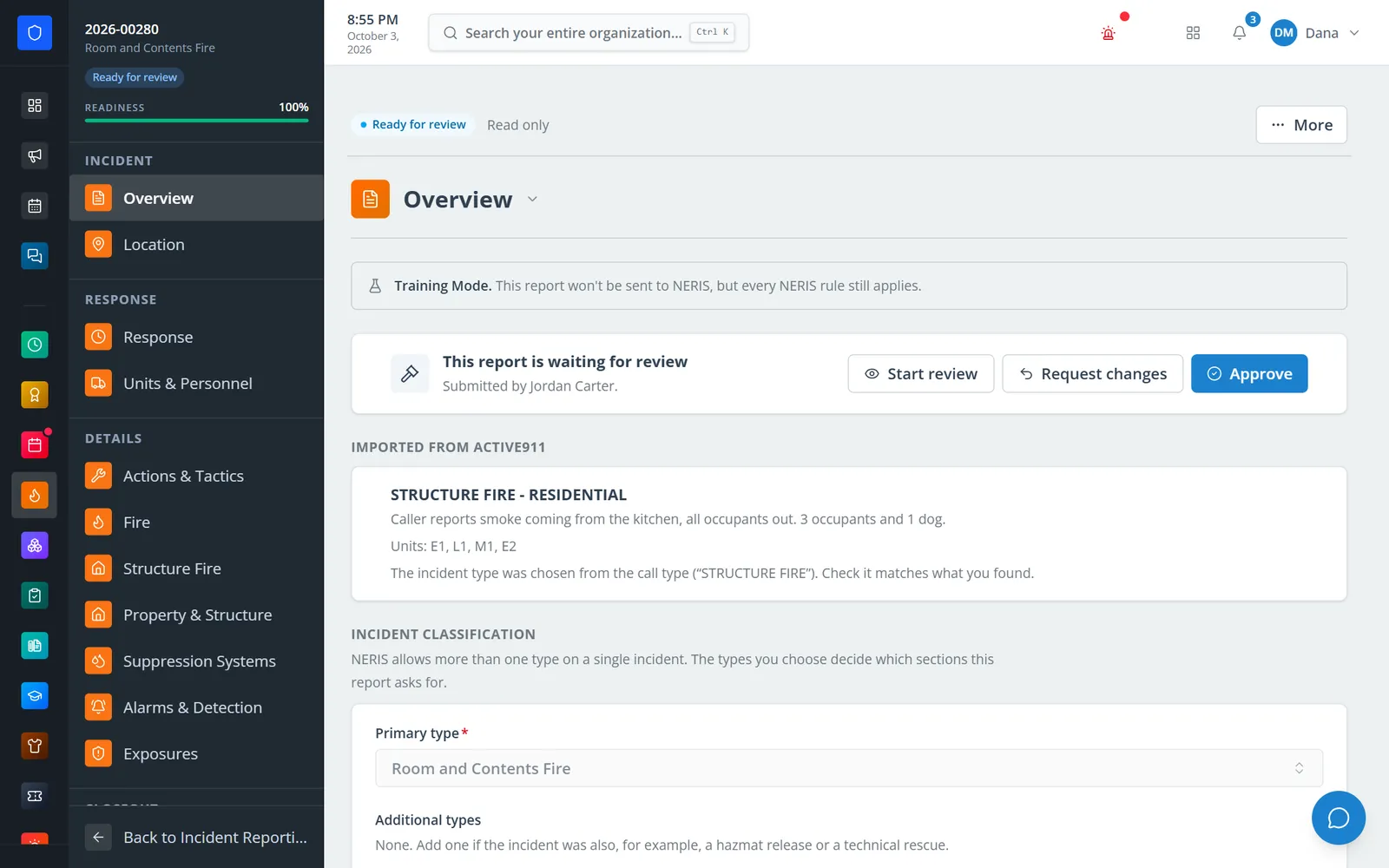
A report started from an Active911 call, complete and waiting for the auditor.
Reporters only see what the incident needs. Sections follow the incident types, including fire, structure fire, alarms, medical, hazmat, rescue, aid, and casualties. A live readiness score climbs to 100 percent as the report is finished. Local NERIS rules run on demand, and you can also check a report against NERIS itself before it's sent.
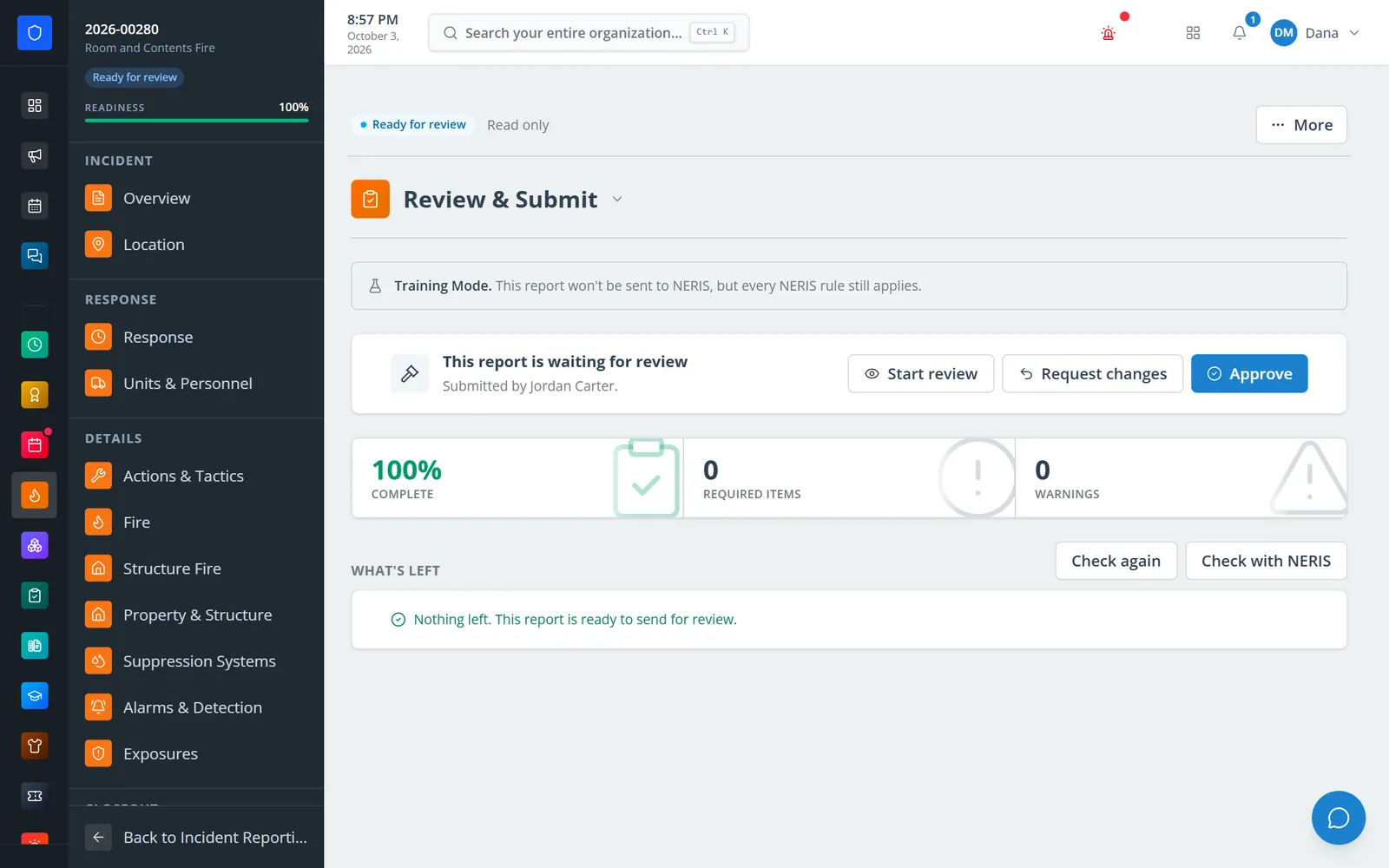
Local NERIS rules run on demand, with an optional check against NERIS itself.
Nothing reaches NERIS without review. An auditor approves each report or asks for specific changes, field by field, from a queue that shows waiting times and assignments, with a full review history. Approval doesn't send the report by itself. An authorized admin sends approved reports, and sends are queued, retried automatically when they fail, and recorded in a Transmissions log.
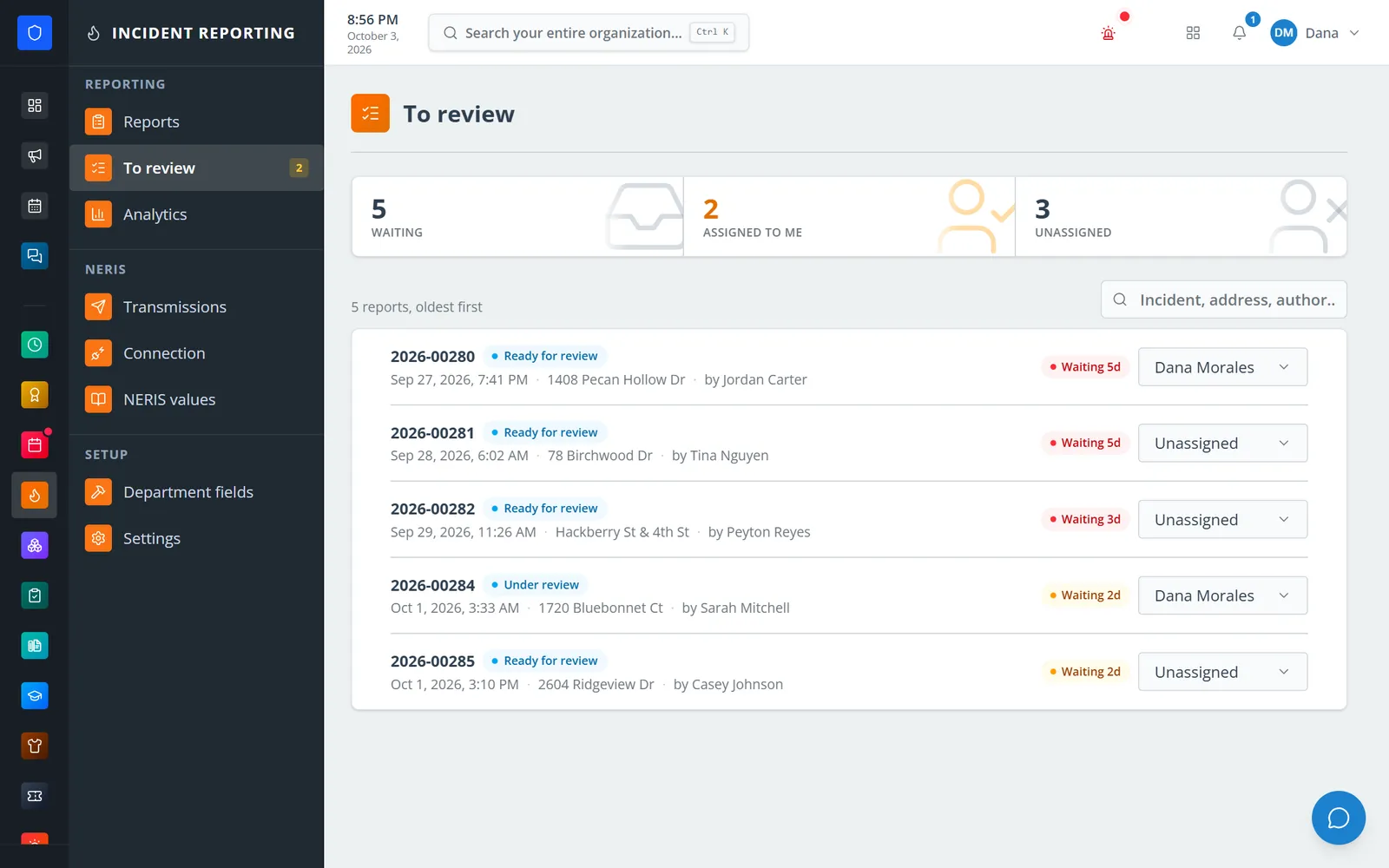
Reports waiting for review, oldest first, with waiting time and assignment.
Practice first. New departments start in Training Mode, which runs every NERIS rule and builds the report without sending it. Sandbox and Production modes are separate, and turning on Production is its own permission.
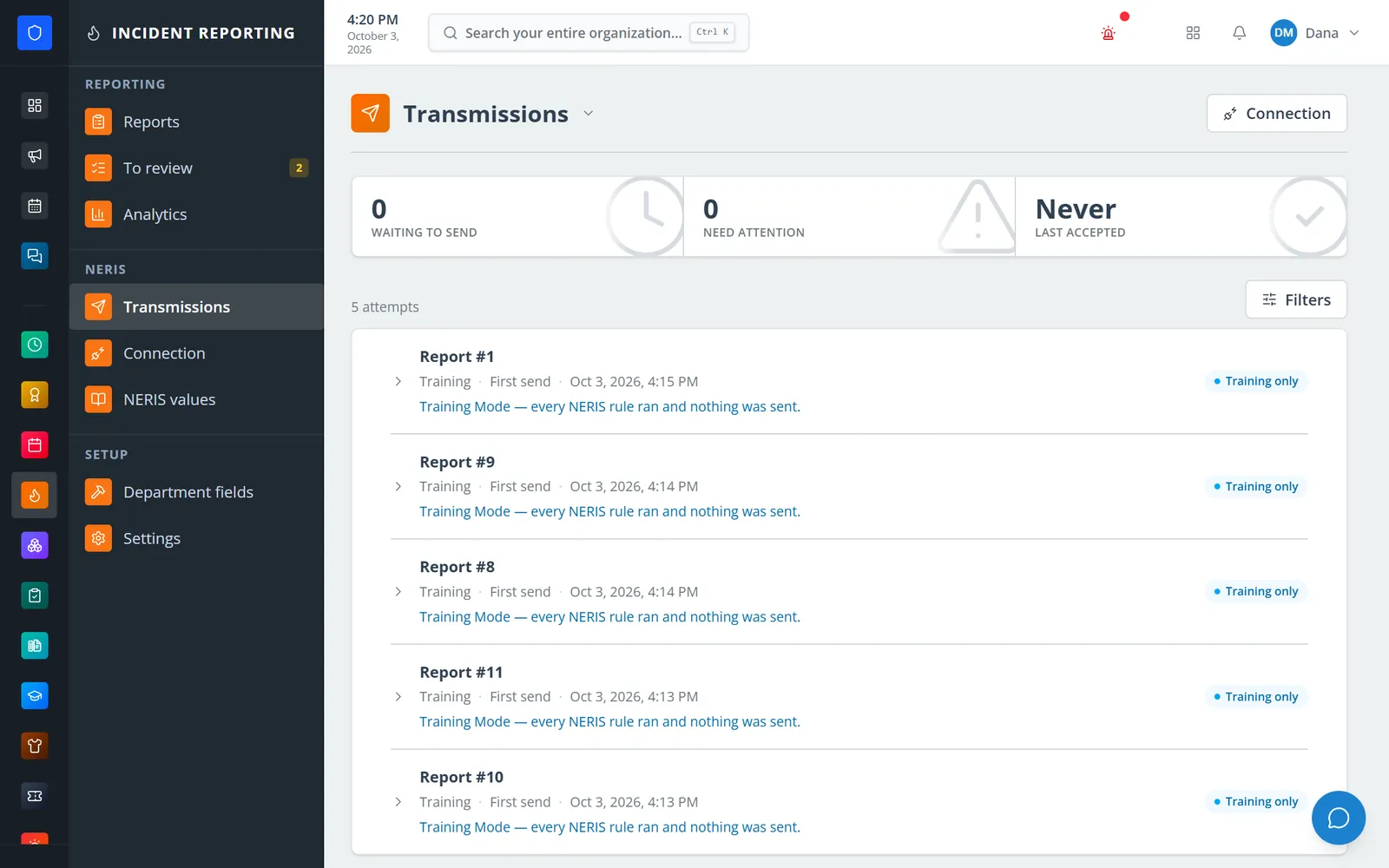
Every send to NERIS is logged. In Training Mode, every rule runs and nothing is sent.
Your records stay yours. Print a full PDF or a public-records PDF that leaves out casualty detail, investigation material, and any attachment marked to keep out of public copies, or export NERIS JSON. Origin-and-cause investigation records are sent to NERIS after the incident is accepted, and analytics show twelve months of incident volume, response times, incident types, and unit utilization.
Station Clipboard is part of the Department Portal, so reports share one roster with personnel, scheduling, training, and the rest of the department. CAD connections are set up in Integrations.
For setup details, start with these Help Center guides: Set up NERIS reporting and department fields, Write, validate, and submit an incident report, and Audit, return, approve, and send a report.
Want to see a CAD call become a NERIS report? Contact us and we'll walk through it with your department's call types.
Frequently Asked Questions
What is NERIS reporting software?
NERIS reporting software is the tool a fire department uses to write incident reports and send them to the National Emergency Response Information System (NERIS), which replaced NFIRS. Good NERIS software starts reports from CAD, checks them against NERIS rules, routes them through an officer review, and sends them directly to NERIS.
Is NFIRS still available?
No. According to the U.S. Fire Administration, incident submission moved exclusively to NERIS on January 1, 2026, the last day to edit 2025 records in NFIRS was January 31, 2026, and NFIRS became unavailable to all users in February 2026.
Do we need new software for NERIS?
If your current software was built around NFIRS and doesn't send reports to NERIS, yes. NERIS uses a different data model than NFIRS, so reporting software has to be built for NERIS rather than relabeled.
Can we report to NERIS and NFIRS at the same time?
Not anymore, since NFIRS is no longer available. During the transition, USFA advised departments not to report to both systems at the same time unless a local or state requirement called for it.
What happened to our old NFIRS data?
USFA asked departments to check their records retention policy and export their eNFIRS data before NFIRS went offline, and said it couldn't provide that data afterward. Records your department kept in its own records system are unaffected, and historical NFIRS public data releases remain available.
Can we practice NERIS reporting before going live?
With the right software, yes. Look for a training mode that runs every NERIS rule and builds the report without sending it, so crews can practice on real incidents. In Station Clipboard, new departments start in Training Mode, and turning on live sending is a separate permission.
What should we look for in NERIS reporting software?
Direct submission to NERIS, validation against NERIS rules before sending, reports started from CAD, sections that match the incident type, an officer review step, a training mode, control over who can send, a transmission log with retries, public-records copies, and full data exports.